What Are the Top UPS Power Types for Global Buyers in 2026?
Choosing the right UPS power system in 2026 means matching protection to the equipment, site, and operating conditions. A small office router may need only basic backup during a brief outage. A medical workstation, server rack, or production control cabinet can require steadier voltage and a carefully planned runtime. The difference matters. A battery label alone does not tell the whole story.
This guide introduces the main UPS types global buyers are likely to compare: standby, line-interactive, online double-conversion, and modular systems. Each serves a different balance of cost, protection, efficiency, and maintenance needs. Standby models suit simple loads. Line-interactive units can help manage common voltage fluctuations. Online systems provide continuous power conditioning, though they may use more energy and cost more. Modular designs offer room to expand, but only when the site and service plan support them.
Buyers should check load capacity, input voltage, frequency, battery options, monitoring, and local service availability before choosing. A unit that works well in one data room may be a poor fit in a warm factory or a remote branch office. Small details count, like battery replacement access and the space needed for airflow. Specifications help, but they do not replace a site assessment. Even careful planning can miss something; that is worth admitting. The sections ahead explain how each UPS type works and what trade-offs to examine before purchasing.
How UPS Systems Protect Equipment During Power Interruptions
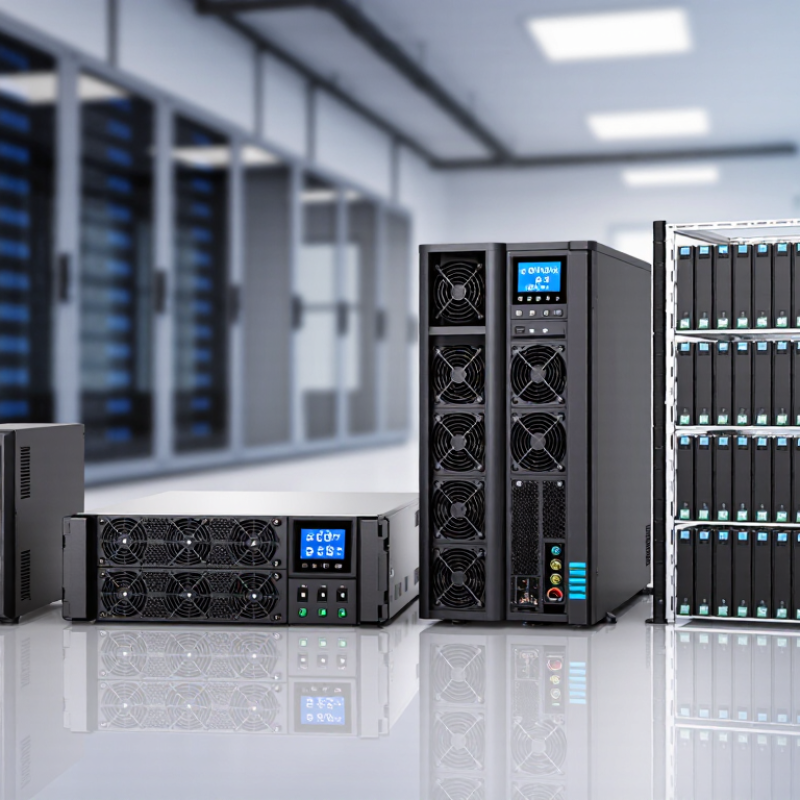
When utility power fails, a UPS bridges the gap between the outage and a safe shutdown or generator takeover. It also filters voltage dips and surges that can reset servers, interrupt network links, or corrupt active work. The protection depends on the UPS type. Offline units switch to battery during a failure, while line-interactive systems also correct many voltage fluctuations. Online double-conversion systems continuously convert incoming power, helping isolate sensitive equipment from irregular supply. That extra protection matters in rooms where even a brief interruption can stop cooling or data services.
The financial stakes are real. Uptime Institute’s 2024 Annual Outage Analysis reports that 54% of surveyed organizations’ most recent significant outages cost more than $100,000. A UPS cannot prevent every outage, but it can provide time for an orderly response. For example, a rack-mounted unit may keep network switches and storage running while a generator starts. Still, runtime estimates can flatter reality. Battery age, room temperature, and connected load all affect how long protection lasts. Check them regularly. A practical setup pairs measured load with tested batteries, clear alarms, and a shutdown plan. That final detail is easy to overlook.
Standby UPS: Basic Backup for Everyday Loads
Standby UPS: Basic Backup for Everyday Loads
A standby UPS suits devices that need brief, dependable backup during an outage. It normally passes utility power to connected equipment and switches to its battery when power fails. For a home router, office computer, or point-of-sale terminal, that short bridge can preserve a connection or allow a safe shutdown. It is a practical choice for everyday loads that do not require continuous power conditioning.
Standby models are generally compact and straightforward, but their protection has limits. The transfer takes a small amount of time, so sensitive equipment should be checked against the unit’s specifications. Battery runtime also depends on the connected load, battery condition, and temperature. A unit that powers a router for an hour may support a desktop computer for only minutes. It is easy to assume the rating tells the whole story; real load testing can challenge that assumption.
Tips: Add the wattage of connected devices before choosing capacity, and leave room for growth. Keep ventilation clear, test the backup periodically, and replace batteries when runtime noticeably declines. Record which outlets provide battery backup; labels can be surprisingly easy to overlook during a rushed outage.
Standby UPS: Basic Backup for Everyday Loads
Typical transfer-time ranges by UPS topology. A standby UPS switches to battery power when utility power fails; connected equipment may experience a brief interruption.
Ranges are representative specifications; actual transfer time varies by model and operating conditions. Online double-conversion systems typically have no transfer interruption.
Line-Interactive UPS: Voltage Regulation for Variable Power
Line-interactive UPS systems suit offices and small facilities where utility power fluctuates but outages are usually brief.
Their automatic voltage regulation can correct moderate dips and rises without switching to battery each time. That matters when lights dim, printers start, or nearby equipment causes a short voltage sag. Less frequent battery use may help preserve battery life, though actual results depend on power conditions and system design.
Look at the equipment you need to protect. A network cabinet with routers and storage devices may need stable output and enough runtime for a controlled shutdown. Check the UPS’s watt rating, not only its VA rating, and leave headroom for startup loads. Pay attention to the correction range, transfer time, outlet layout, and battery replacement access.
Small details matter.
A unit tucked under a desk can be awkward to service.
Line-interactive models do have limits. They do not provide the same continuous power conversion as online UPS systems, so sensitive equipment or sites with severe, frequent disturbances may need another approach. Measure voltage changes over several days if possible; a basic power log can reveal patterns that a single reading misses. I have seen buyers focus on runtime and overlook heat and ventilation.
That is easy to do, and worth reconsidering.
Online UPS: Continuous Protection for Critical Systems
Online UPS: Continuous Protection for Critical Systems
An online UPS supplies power through a continuous conversion process. Incoming AC power is converted to DC, then recreated as stable AC for connected equipment. Because the load receives power from the inverter, transfer delays during many utility disturbances are avoided. That matters in server rooms, diagnostic labs, and control systems where even a brief interruption can disrupt work.
The protection is practical, not magical. An online UPS can help manage voltage fluctuations and provide battery power during an outage, but runtime depends on load, battery condition, and system design. A technician should check the measured demand, required backup time, ventilation, and maintenance plan before specifying capacity. For example, a rack drawing 2 kW needs a different battery arrangement from one drawing 500 W. Small detail. Battery aging is easy to underestimate, too.
Continuous conversion can generate more heat and use more energy than some alternative UPS designs. That trade-off deserves attention, especially in warm equipment rooms. Review efficiency figures at realistic operating loads, not only at full capacity, and test alarms and bypass arrangements under controlled conditions. A well-sized system supports uptime; a neglected battery can still fail when needed. There is no perfect setup, and site conditions may change after installation.
How Global Buyers Can Match UPS Types to Their Requirements
Global buyers should match UPS types to load behavior, not market popularity. Standby UPS units suit basic office devices and short, infrequent outages. Line-interactive models fit small networks, retail systems, and workshops with unstable voltage. A 2 kVA unit can protect a router, switch, and several workstations, but runtime may fall sharply after battery aging.
Online double-conversion UPS systems are safer for medical equipment, industrial controls, and data-center servers. They continuously rebuild clean power, protecting sensitive loads from voltage dips and frequency changes. The Uptime Institute’s 2024 Global Data Center Survey reported that 53% of outages cost below 100,000 dollars, while some exceeded 1 million dollars. That gap makes downtime planning more important than simply choosing the lowest purchase price.
For growing facilities, modular UPS systems allow capacity to expand in smaller steps. They also support maintenance without shutting down every connected load, when correctly designed. Lithium-based storage can reduce footprint and improve cycling performance, while valve-regulated lead-acid batteries may remain practical where budgets are tighter. The IEA’s Electricity 2024 report expects data-center electricity demand to rise sharply toward 2026. Efficiency matters. Yet a buyer should question every promised runtime figure. Testing conditions rarely match a dusty room, cold battery cabinet, or sudden server surge. Load profile, service access, ambient temperature, and five-year replacement cost should guide the final selection.
What Are the Top UPS Power Types for Global Buyers in 2026? — How Global Buyers Can Match UPS Types to Their Requirements
Compare common UPS topologies by protection, typical applications, and purchasing considerations. Performance varies by model, load, and local power conditions; confirm specifications with the product datasheet.
| UPS Type |
How It Works |
Typical Transfer Time |
Power Protection |
Best-Fit Applications |
Key Buying Considerations |
| Standby (Offline) |
Normally supplies utility power to the load and switches to battery-backed inverter power when input power fails or falls outside its operating limits. |
Usually a few milliseconds; check the specific model’s published figure. |
Basic outage protection; surge and filtering features depend on the model. Limited correction of sustained voltage fluctuations. |
Home computers, routers, point-of-sale terminals, and other cost-sensitive equipment with moderate protection needs. |
Check connected equipment’s tolerance for transfer time, required runtime, outlet types, and battery replacement availability. |
| Line-Interactive |
Uses automatic voltage regulation, commonly through a transformer, to correct some overvoltage and undervoltage conditions without switching to battery; switches to battery during outages or conditions beyond its range. |
Usually a few milliseconds when switching to battery; verify the model specification. |
Outage protection plus voltage correction within the unit’s regulation range. Protection from electrical noise and surges varies by design. |
Small offices, network closets, retail systems, and areas with frequent sags or swells. |
Compare the input-voltage regulation range, output waveform on battery, load capacity, and behavior with generators. |
| Online Double-Conversion |
Continuously converts incoming AC to DC and then regenerates AC for the load. The inverter normally supplies the load, so there is no transfer to battery during a utility outage. |
Zero transfer time to battery in normal double-conversion operation; bypass transfers may have different behavior. |
Strong isolation from many input-voltage and frequency variations. Output quality, filtering, and bypass performance depend on the model and operating mode. |
Data centers, critical IT, communications, medical or industrial systems where supported, and sensitive equipment requiring continuous conditioned power. |
Assess efficiency at the expected load, thermal output, maintenance bypass, service access, redundancy needs, and total cost of ownership. |
Practical Matching Checklist for Global Buyers
| Requirement |
What to Check |
| Load capacity |
Calculate the connected load in watts and volt-amperes (VA), including startup or peak demand. Do not select by VA rating alone. |
| Runtime |
Use the manufacturer’s runtime chart at the intended load. Runtime depends on battery capacity, battery condition, temperature, and load level. |
| Local electrical system |
Confirm nominal input and output voltage, frequency, phase, plug and receptacle types, and compatibility with local wiring and generators. |
| Installation environment |
Review operating temperature, ventilation, humidity limits, noise, enclosure rating, mounting, and available floor or rack space. |
| Compliance and service |
Check applicable local safety and electrical requirements, warranty terms, battery replacement options, service availability, and end-of-life battery handling. |
General guide only: UPS specifications and suitability vary by product and installation. Confirm all ratings and local compliance requirements before purchase.